
07 Aug 202615:05
A simpler chat footer
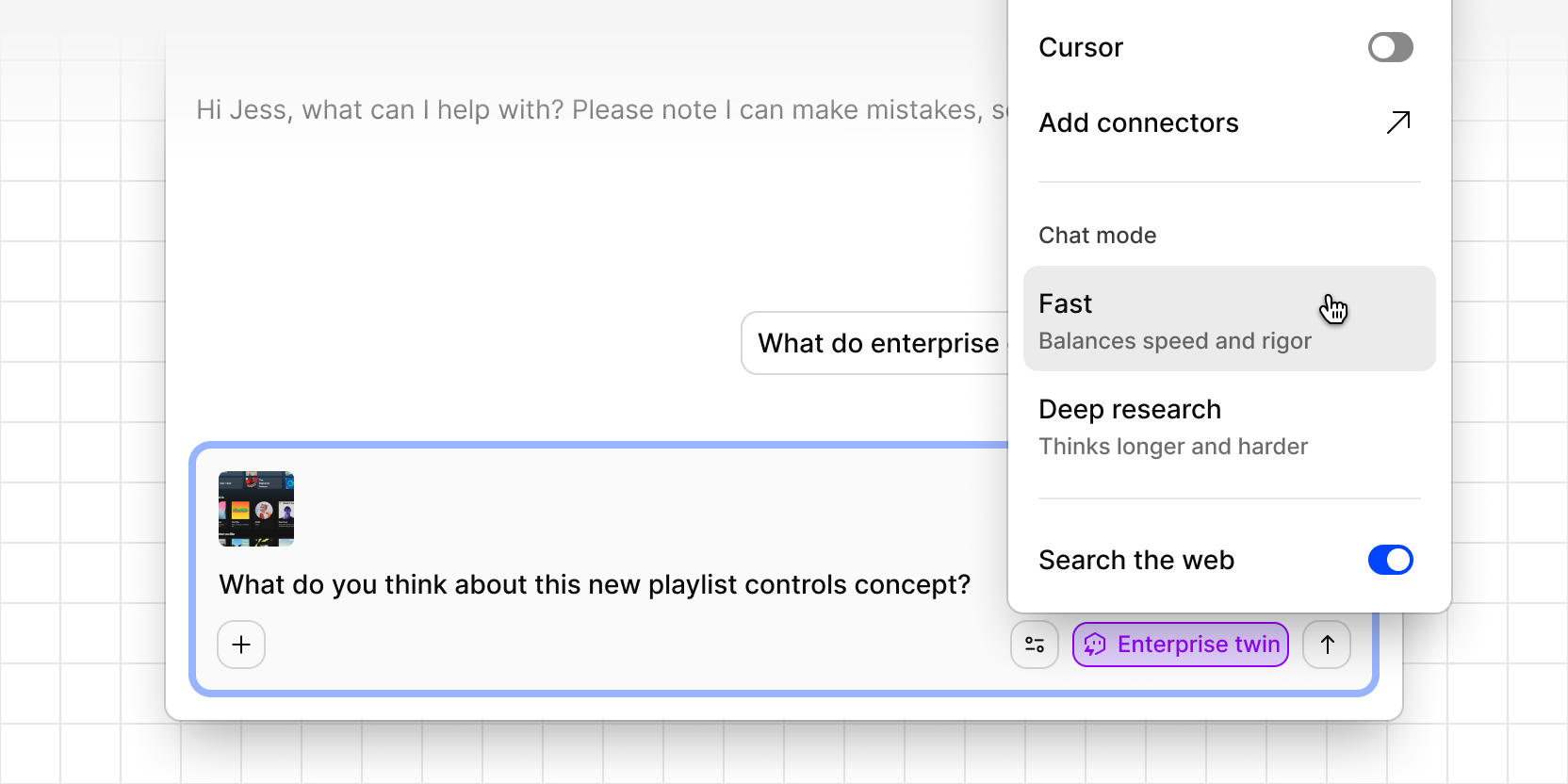
Chat’s footer is doing less, so you can find what you need faster.
- Search the web has moved into Configure, grouped under its own heading alongside Connectors and Chat mode. It’s still one toggle away, just out of the footer’s way.
- Add and Attach are now a single + menu instead of two separate buttons, so there’s one place to add context.
- Attached context shows the actual source name when you’ve added one, or “3 sources” when you’ve added more, instead of a truncated label followed by “N more…”
- New chat now lives with your conversation history instead of sitting apart from it, in both the corner chat and the full mobile view, matching how it already worked in the sidebar. Start a new conversation right from the list you’re already scanning.
- Attached files show up as thumbnails above the composer instead of a text lozenge and a separate upload toast. Images preview instantly, and other file types get a labeled tile, so you can see what’s attached and whether it uploaded before you hit send.
The digital twin picker stays right where it was, since that’s the one footer control you reach for mid-conversation. Once you’ve selected a twin, the picker itself becomes a pill with its name on it, so it’s clear which twin the conversation is scoped to.